ShareX
Custom Uploader Settings
Open ShareX and select Custom uploader settings... from the sidebar. Create a new uploader with the following values:
- Destination type: Image uploader, File uploader
- Method: POST
- Request URL: https://api.qbox.re/v1/file
- Body: Form data (multipart/form-data)
- Header:
- Name:
Authorization - Value:
YOUR_API_KEY_FROM_DASHBOARD
- Name:
- File form name:
file - URL:
{json:data.url}
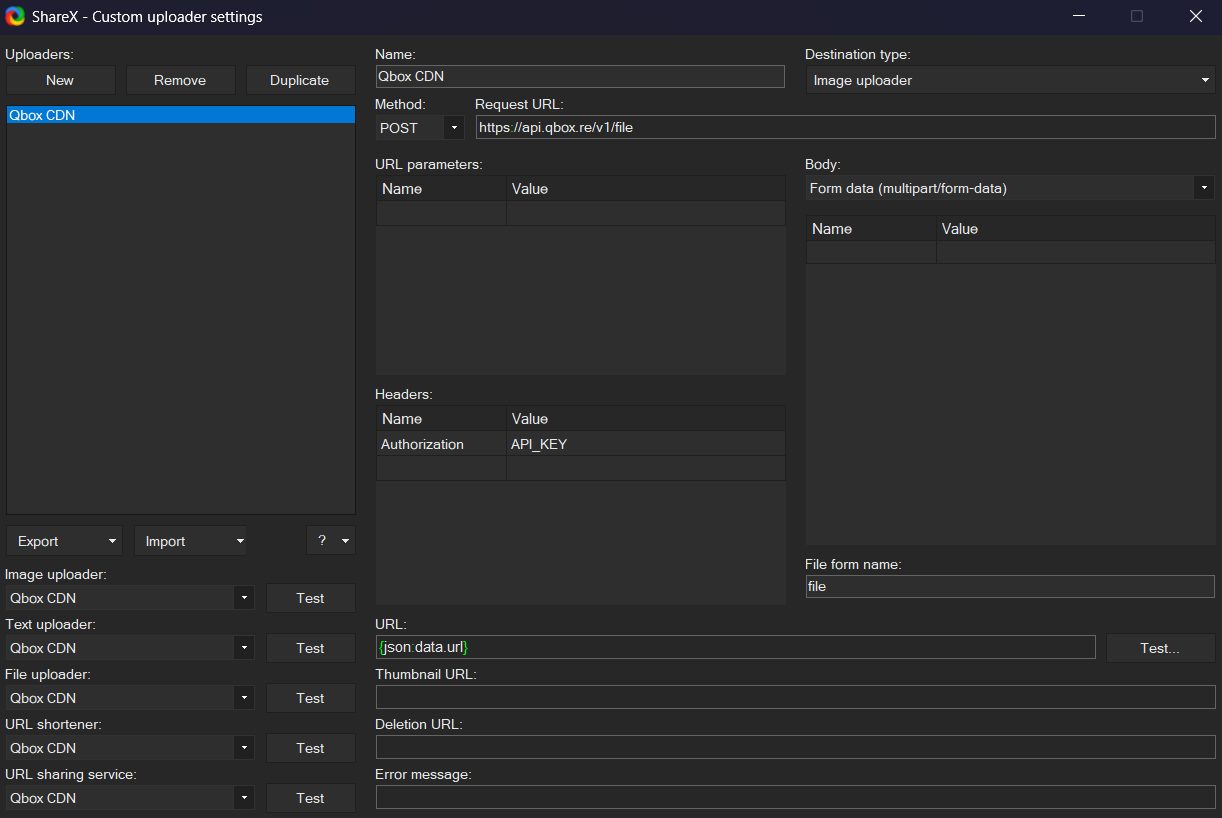
ShareX Setup
- Under
After capture tasks, select only:Upload image to hostDelete file locally
- Under
After upload tasks, select only:Copy URL to clipboard
- Under
Destinations, set bothImageandFiletoCustom uploader
Now each time you make a screenshot or recording your own storage space won't be filled up and the corresponding URL will be copied into your clipboard for you to paste anywhere you like.
<div style={{ display: 'flex', gap: '1rem', flexWrap: 'wrap' }}> <img src="https://r2.qbox.re/chatty/docs/sharex-after-capture-tasks.png" alt="ShareX After capture tasks" style={{ flex: '1 1 320px', minWidth: 0 }} /> <img src="https://r2.qbox.re/chatty/docs/sharex-after-upload-tasks.png" alt="ShareX After upload tasks" style={{ flex: '1 1 320px', minWidth: 0 }} /> <img src="https://r2.qbox.re/chatty/docs/sharex-destinations.png" alt="ShareX Destinations" style={{ flex: '1 1 320px', minWidth: 0 }} /> </div>